SNAP Resupply
Brightree LLCMedical
4.3620.00 Reviews
- Version
- 4.3.5
- Installs
- 100.00K
- Age Rating
- Everyone
Screenshots
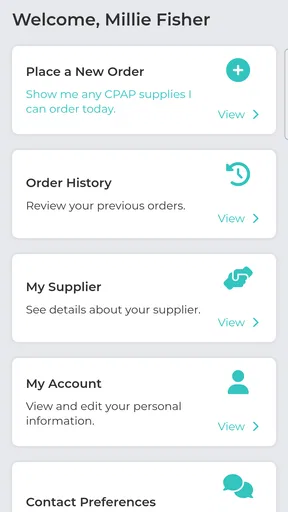
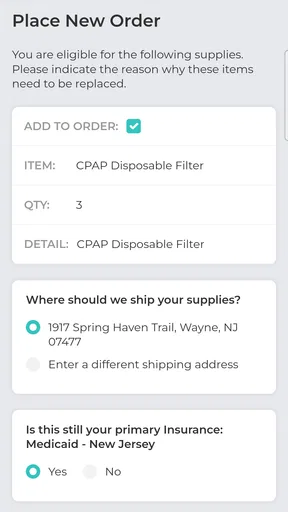
Our Review of SNAP Resupply
 Analysis by Appyee
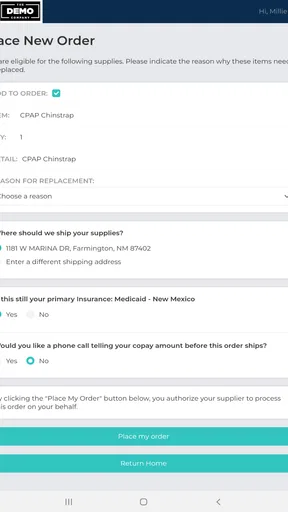
Managing medical supplies is rarely difficult because of the product itself. The frustrating part is remembering when to reorder, finding the right contact, and explaining your needs again when you are already tired or busy. SNAP Resupply is built around that narrow but important problem. I see it as a practical medical app for patients who want to handle resupply requests from a phone instead of relying entirely on calls, paper notes, or a separate reminder system.
My first impression is that its value depends less on entertainment or visual polish and more on whether it makes an existing resupply relationship easier to manage. That distinction matters. This is not a general health tracker, symptom diary, medication reminder, or diagnostic tool. It is a focused channel for addressing supply needs. If that matches your situation, the limited scope can be a strength. If you are looking for broader health management, you will probably need another app alongside it.
What SNAP Resupply is really useful for
SNAP Resupply comes from Brightree LLC and is listed as a free medical app for everyone. It has been available since January 7, 2019, and the current version is 4.3.5. Its audience is clear: patients who need a convenient way to deal with recurring medical supply needs and want to reduce the small pieces of administration that often surround those orders.
In an everyday situation, I can imagine using it when I notice that a box of supplies is running low during a normal evening at home. Instead of waiting until the last item is gone, I would open the app, review the available resupply path, and deal with the request while the need is still manageable. That timing is important. A resupply tool is most helpful when it supports planning rather than becoming an emergency button after supplies have already run out.
The app’s narrow purpose also sets the right expectations. It should not replace medical advice, a clinician’s instructions, or urgent contact with a care team. If a product is defective, a prescription has changed, or a health problem requires immediate attention, a standard clinical or support channel may be more appropriate. I would use this app for the administrative side of obtaining supplies, not for deciding what treatment or equipment I should use.
Its public reception suggests that the basic idea works for a meaningful group of users: it holds a 4.3 average from around 1.3 thousand ratings, with roughly 620 written reviews and over 100 thousand installs. Those figures do not prove that every patient will have the same experience, but they do indicate that this is an established tool rather than an obscure experiment.
Trust starts with a limited promise
For a medical app, I pay attention to whether the product makes a modest, understandable promise. Here, the purpose is easy to describe: handle resupply needs through a mobile app. That is more reassuring to me than an app that presents itself as a complete health platform while quietly asking users to manage many unrelated tasks.
The developer is identified as Brightree LLC, which gives the app a clear point of responsibility. I still would not treat the developer name alone as proof that every workflow will suit my particular provider or insurance arrangement. Resupply is often connected to patient records, product eligibility, shipping details, and account status. Those practical dependencies can affect the experience even when the app itself is straightforward.
The age classification is Everyone, which makes the app broadly accessible from a content perspective. That should not be confused with medical independence. A younger person or a family member may be able to use the interface, but an adult caregiver or authorized account holder may still need to oversee the request depending on the patient’s circumstances. I would clarify that responsibility before relying on the app for someone else.
What I would check before depending on it
Before making SNAP Resupply part of my routine, I would confirm that the relevant supplier or care arrangement supports it. The app’s purpose is specific enough that compatibility matters more than simply being able to install it. If my orders normally go through a different organization, or if my supplies require a special authorization process, using a general phone call or the provider’s own portal may be faster.
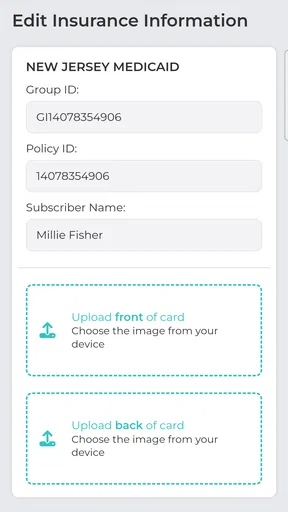
I would also complete any account setup carefully, especially where names, addresses, contact details, or patient information are involved. A resupply request is not the place for an old address or an outdated phone number. My practical advice is to review those details before the first request and again after any move, insurance change, or change in caregiver.
Because this is a medical app, I would avoid treating a confirmation screen as the same thing as delivery in hand. A request can be submitted while a later step still depends on review, availability, authorization, or shipping. I would keep my usual backup contact method until I knew how the process worked for my account.
Visible choices matter more than convenience alone
When an app deals with health-related information, I want to see clear choices at the moments that matter. That includes knowing which account is active, understanding what information is being entered, and having a chance to correct an error before submitting a request. I would slow down at those points rather than tapping through quickly.
I would also look for ordinary account controls such as signing out on a shared device, reviewing saved contact information, and checking whether another person can access the account. I am not assuming that every control is available in the same place or that every account has identical options. My point is that these are the controls I would actively look for before using the app around family members, caregivers, or a borrowed phone.
A useful habit is to keep the app on a personal device protected by the device’s own lock. That is not a special claim about SNAP Resupply; it is simply sensible behavior for any application connected to patient information. If I used a shared tablet, I would be especially careful about signing out and checking who can open the device.
I would not grant access casually if the operating system presents a permission request. I would read what the permission is for and decide whether it is necessary for the action I am trying to complete. If a permission seems unrelated to resupply, I would pause and seek clarification through the appropriate support channel rather than approving it automatically.
Handling sensitive moments in the workflow
The most sensitive part of a resupply app is not necessarily the first screen. It is the point where personal details, product information, shipping information, or account identifiers are entered or confirmed. That is where I would check every field, particularly if the phone has autofill enabled or if another person helped with setup.
I would also avoid submitting a request while connected to an untrusted public network if I could reasonably wait. Again, this is a cautious personal practice rather than a statement about the app’s technical design. Medical administration deserves the same care I would give online banking or an insurance account.
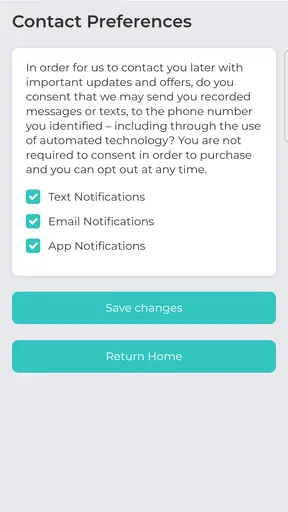
Notifications deserve attention too. On a locked screen, a notification can sometimes reveal more than the owner expects. I would review the phone’s notification settings and decide whether previews should appear. If a caregiver needs updates, I would agree on a method that does not expose information to everyone who happens to see the device.
Another overlooked issue is the difference between the patient and the person doing the administration. A family member may be the one holding the phone, while the request belongs to someone else. I would make sure the active account and patient identity are correct before sending anything. This simple check can prevent a surprisingly serious mix-up.
Where the focused design helps
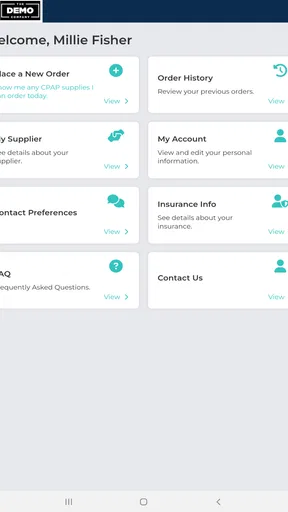
Compared with calling a supplier, a dedicated resupply app can be more convenient when I already know what I need and want to handle the request outside office hours. I do not have to wait for someone to answer, repeat basic details aloud, or search through old messages for a phone number. For recurring needs, having one place to start can reduce mental clutter.
Compared with a broad health app, the focused design is easier to understand. I would not need to sort through exercise dashboards, medication logs, symptom charts, or unrelated wellness content just to find a resupply task. That simplicity is valuable for someone who wants an administrative tool rather than another all-purpose health platform.
Compared with a paper reminder, the app can put the action closer to the moment I notice a need. A note on the refrigerator may remind me to reorder, but it does not necessarily help me begin the request. The trade-off is that a paper note works without a phone, an account, or an app workflow. Someone with unreliable internet access, limited comfort with smartphones, or a complicated order may still prefer a call.
Compared with a provider’s full web portal, a mobile resupply tool may feel less overwhelming for this one task. On the other hand, a full portal can sometimes be better when I need invoices, insurance documents, appointment information, or a detailed history in the same session. I would choose based on the job in front of me rather than assuming one channel is always superior.
Three practical habits that improve the experience
First, I would start the reorder earlier than the absolute last possible moment. The app can make submitting a request easier, but it cannot remove every outside delay. Leaving a buffer gives me time to resolve an incorrect address, a changed product, or a question from the supplier without turning the situation urgent.
Second, I would keep a simple personal record of what I requested and when. That might be a calendar note or a private reminder, not a duplicate medical database. The reason is accountability: if the delivery does not arrive, I can describe the request clearly instead of relying on memory. This is especially useful when more than one person helps manage the patient’s supplies.
Third, I would use the app for routine requests and switch channels when the request becomes unusual. A changed prescription, a new product, a damaged shipment, or a question about coverage may need a human conversation. Trying to force an exceptional case through a routine resupply path can create more delay than making a direct call at the beginning.
A fourth habit is to review the account after any major life change. A move, a new caregiver, a new insurance arrangement, or a change in clinical equipment can make previously correct information unreliable. I would not assume that a successful earlier order means every future request will be correct automatically.
Who should use it, and who should skip it
I think SNAP Resupply is best suited to patients who have recurring supply needs, prefer handling routine administration on a phone, and are comfortable checking account details before submitting a request. It may also help a caregiver who regularly manages these tasks, provided the account arrangement and patient identity are clear.
I would be more cautious if I needed detailed clinical guidance, immediate troubleshooting, or a complete record of healthcare activity. This is not the tool I would choose as my only medical app. I would also hesitate if my supplier does not use the same resupply process, because convenience disappears when I still have to repeat the request elsewhere.
People who dislike account-based services or have difficulty using mobile interfaces may reasonably prefer phone support. The app is free, but “free” does not eliminate the costs of setup, attention, connectivity, or correcting mistakes. For a person who finds digital forms stressful, a knowledgeable representative may be the more efficient option.
My cautious verdict
After looking at SNAP Resupply as a practical medical tool rather than a general health product, I see a clear benefit: it gives routine supply administration its own focused place. I like that the purpose is easy to understand, and I would recommend trying it when the patient’s supplier and account situation fit the workflow.
My recommendation comes with a boundary. I would use it for ordinary resupply requests, verify the patient and delivery details every time, protect access on the phone, and keep a backup contact method until I understood how confirmations and follow-up worked. I would not use it to replace urgent support, clinical advice, or a conversation about an unusual order.
The app has reached a useful level of adoption, with more than 100 thousand installs, and its current version is 4.3.5. Those details make it reasonable to consider, but the deciding factor for me would still be personal fit. If it connects cleanly with the way I already receive supplies, it could remove a recurring administrative nuisance. If it does not, the usual phone call or a broader provider portal may remain the better choice.
My bottom line: SNAP Resupply is worth trying for patients who want a dedicated, phone-based route for routine supply needs. I would recommend it as a convenience layer, not as a complete healthcare service. Its strongest quality is focus, while its main limitation is that the usefulness of that focus depends on the surrounding supplier and account process.
Verdict
Strengths of SNAP Resupply
- Quickly check available supplies and resupply locations.
- Useful for planning missions away from regular supply points.
- Clear focus on logistics and resource management.
- Can reduce time spent searching for essential supplies.
- Helpful companion for users already in the SNAP ecosystem.
Limitations of SNAP Resupply
- Requires reliable internet access for current information.
- Coverage may vary depending on location and available listings.
- Some features may require an account or organization access.
- Information can become outdated if locations change.
- Limited usefulness for people outside supported regions or services.
Similar Picks in This Category
View All
WebMD: Symptom Checker
WebMD, LLC4.1

Microphone Amplifier
DOSA Apps4.2

Anatomy Learning - 3D Anatomy
3D Medical OU4.5

Period Tracker and Calendar
SimpleInnovation4.9

GoodRx: Prescription Coupons
GoodRx4.8

CVS Health
CVS Pharmacy4.5
Frequently Asked Questions
What is SNAP Resupply, and who is the app designed for?
SNAP Resupply is designed to help eligible users manage and access information related to the Supplemental Nutrition Assistance Program, commonly known as SNAP. Depending on the version and region, it may provide tools for checking benefits, finding participating retailers, reviewing account information, or locating useful program resources. Availability and features can vary, so users should confirm that the app supports their state or local SNAP program before downloading.
Can I use SNAP Resupply to apply for SNAP benefits or manage my existing case?
The app may offer helpful information and access to selected SNAP-related services, but it should not automatically be assumed to replace your state’s official benefits portal or caseworker. Application, renewal, eligibility, and reporting procedures are usually handled through the appropriate government agency. Before entering personal details, check whether SNAP Resupply clearly identifies the services it supports and use official state resources for sensitive case actions whenever possible.
Is SNAP Resupply available on both Android and iPhone?
SNAP Resupply availability depends on the device, operating system, and distribution region. Before installing it, check the official Google Play Store or Apple App Store listing for supported versions, developer information, recent updates, and user reviews. If the app does not appear in your store, it may be unavailable in your country, limited to certain states, or temporarily removed. Avoid downloading unofficial APK files from unknown websites.
Does SNAP Resupply require my personal or benefits information?
Some SNAP-related features may require information such as an account login, case details, location, or contact information, while other tools may work without registration. Review the requested permissions and the app’s privacy policy before continuing. Pay particular attention to how information is collected, stored, shared, and deleted. Never provide your EBT PIN, full card details, or other highly sensitive information unless the app’s legitimacy and purpose are clearly verified.
What should I do if SNAP Resupply is not working or the information appears incorrect?
If SNAP Resupply fails to load, displays outdated information, or does not recognize your account, first check your internet connection, install available updates, and restart the app. You can also review its support or contact options. For benefit balances, eligibility decisions, payment issues, or case changes, contact your state’s official SNAP agency directly, because third-party app information may not always be current or authoritative.
